




1 min read
Beyond the Slide Deck: The Value of a Facilitator Guide in Training
Great training requires more than just PowerPoint Slides. Step into any modern training session, and you’ll likely observe a PowerPoint slide deck...

3 min read
Pat Michaels
:
Updated on May 12, 2026
PowerPoint has become the backbone of training presentations worldwide. Its familiar slides, engaging visuals, and adaptability make it a go-to tool for trainers in every conceivable field. Yet, despite its overwhelming presence in the ILT classroom, PowerPoint is often misused.
Instead of enhancing the learning experience, poorly crafted presentations can undermine engagement, obscure key messages, and leave audiences feeling bored or bewildered.
Let’s explore the most common PowerPoint pitfalls found in training presentations, examine why they pose problems, and—most importantly—offer practical strategies for avoiding them. Whether you’re a seasoned trainer or new to the facilitator’s role, these insights will help you captivate your audience, clarify your message, and spark real learning.
Too often, trainers treat slides as a script or a dumping ground for every fact, figure, and phrase they wish to impart. The result? Slides packed with dense paragraphs and bullet lists that overwhelm audiences and tempt them to read ahead instead of listening.
Embrace brevity. Use keywords and short phrases instead of full sentences.
Use handouts or participant materials to supplement the training and provide a post-course resource.
Follow the “4 x 6” rule: No more than four bullet points per slide, and no more than six words per bullet.
A haphazard flow or unclear organization can make even the most interesting content hard to follow. Audiences need a road map, a clear path from introduction to conclusion.
Why it’s a problem: Disorganized presentations lead to confusion and frustration, obscuring your key messages.
Begin with an agenda or outline to establish clear expectations.
Group related content into logical sections.
Use clear headings and transitions to guide your audience through the material.
End with a summary or key takeaways to reinforce learning.
Clashing colors, tiny fonts, crowded layouts, and low-resolution images are more common than you'd think. Aesthetics matter: a visually chaotic slide deck distracts from your message and can cause eye strain or confusion.
Why it’s a problem: Poor design diminishes credibility and makes content harder to absorb.
Choose a clean, professional template with consistent fonts and color schemes. Better yet, follow your brand style guide.
Ensure ample whitespace to avoid clutter.
Use high-quality images and graphics that reinforce your message.
Limit the number of colors and font styles. Remember, less is more.
Apply bold or contrasting colors to highlight, not decorate.
Reading every word off your slides is a surefire way to lose your audience’s attention. Learners quickly tune out when the presenter simply duplicates what’s on the screen or what they can read themselves.
Why it’s a problem: Repetition without added value leads to disengagement and signals a lack of mastery or enthusiasm.
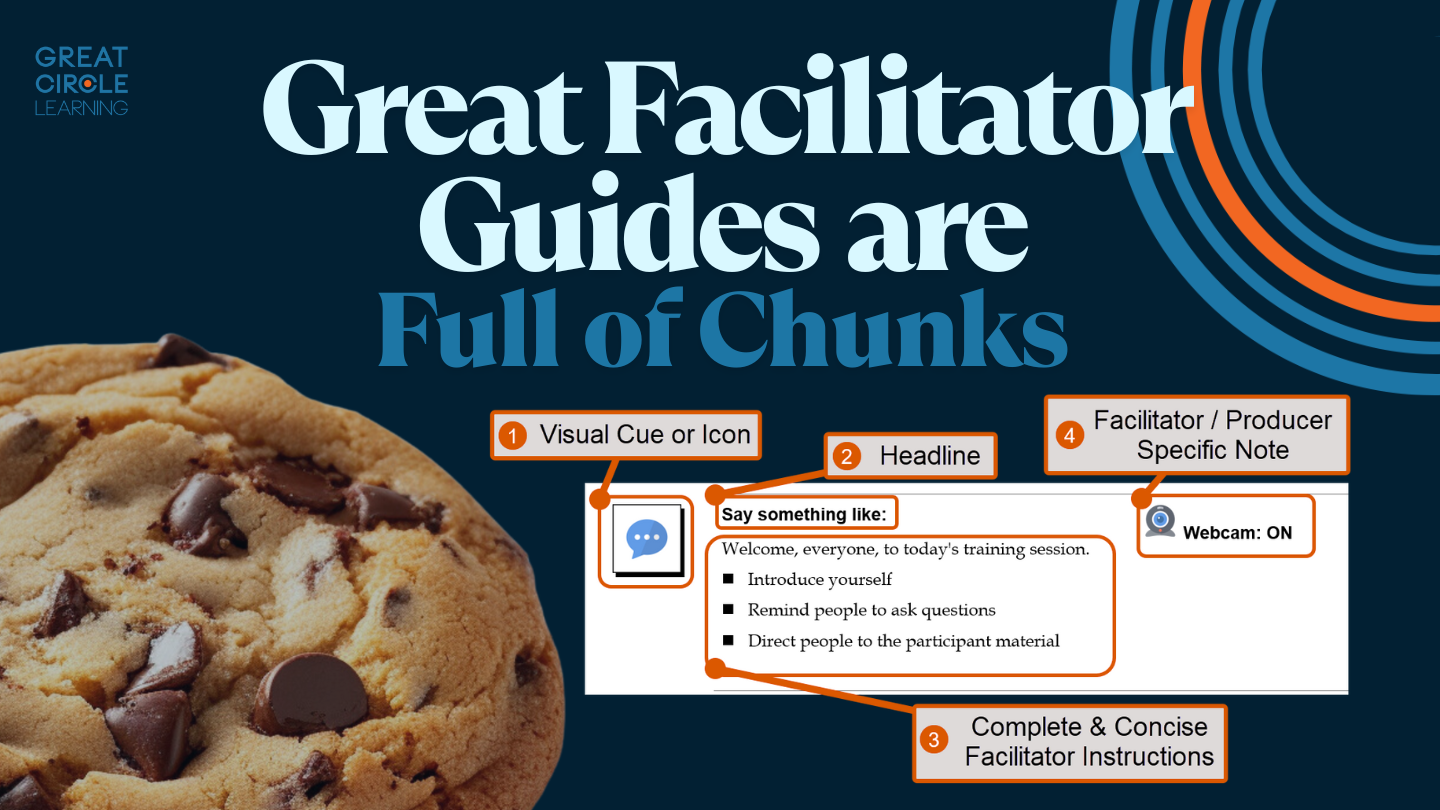
Use slides as visual aids, and keep the material to be delivered in the facilitator guide.
Maintain eye contact and interact with the audience or camera to maintain a high level of energy.
Practice your delivery so you can move beyond the words on the screen.
Training isn’t a one-way street. When trainers barrel through slides without inviting participation or checking for understanding, learners become passive recipients rather than active participants.
Why it’s a problem: Audience disengagement leads to poor retention and missed learning opportunities.
Involve the learner.
Pose questions, encourage discussion, or use polls and quizzes.
Include interactive elements such as case studies or group exercises.
Check in regularly: “Does this make sense?” or “Any questions so far?”
Animations and transitions can draw attention to key points on a slide, but overuse or misuse can be distracting and even irritating. Elements on the slide that bounce, twirl, or fade in and out without purpose quickly lose their charm.
Why it’s a problem: Excessive animation detracts from content and can appear unprofessional.
Use animations sparingly and only to direct attention to key points.
Stick with simple, consistent transitions throughout your presentation. My favorite is the Morph transition.
Presentations that don’t resonate with the specific needs, background, or interests of the audience fall flat. Generic content signals that the trainer hasn’t done their homework.
Why it’s a problem: Learners struggle to connect with the material, reducing motivation and learning outcomes.
Research your audience: What are their roles, challenges, and goals?
Customize examples and case studies to make content relevant.
Use inclusive language and acknowledge the diversity of your learners.
Accessible design is often overlooked, but it’s essential for inclusivity. Slides that ignore color contrast, font size, or alternative text exclude learners with visual or hearing impairments.
Why it’s a problem: Lack of accessibility creates barriers and may violate legal standards.
Use high-contrast color schemes and legible fonts (at least 24pt for body text).
Provide alternative text for images and graphics.
Ensure videos have captions or transcripts.
PowerPoint is a powerful ally in the trainer’s toolkit, but only if used thoughtfully and creatively. By recognizing and avoiding these common pitfalls, you can transform your training presentations from mundane to memorable.
Remember: clarity, engagement, and audience focus are your guiding stars. Strive for simplicity in design, relevance in content, and interaction in delivery. With each presentation, you have the opportunity not just to convey information but to inspire, connect, and empower your learners. The slides are yours, make them count.
1 min read
Great training requires more than just PowerPoint Slides. Step into any modern training session, and you’ll likely observe a PowerPoint slide deck...

1 min read
Instructor-led training isn’t going anywhere. But the expectations around how it’s designed and delivered have changed.
1 min read
Most organizations are pretty good at creating training. The real struggle is delivering it consistently. You can have solid content, good slides,...