


Software Management
How to Activate LeaderGuide Pro
Follow these steps to activate LeaderGuide Pro and apply your license key to start creating standardized facilitator and participant guides right away.
Activate
License Key
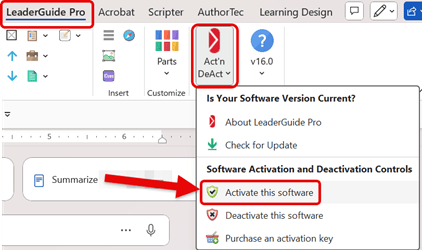
1. Open Microsoft Word to Access LeaderGuide Pro.
-
Click on LeaderGuide Pro on the Word ribbon
-
Click on Act'n DeAct on the LeaderGuide Pro tab
-
Select Activate this software from the drop-down menu
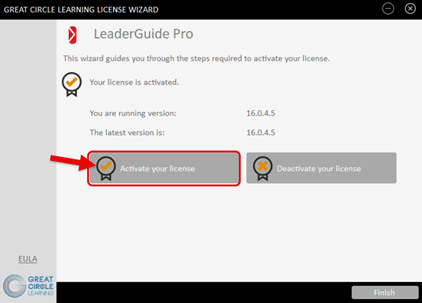
2. This Launches the Great Circle Learning License Wizard.
- Click the Activate your license button
-
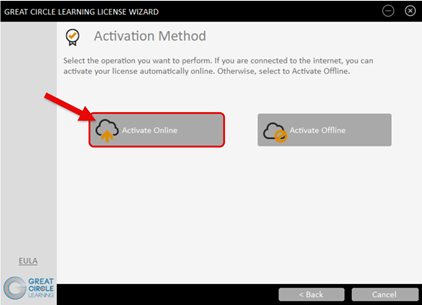
Click the Activate Online button
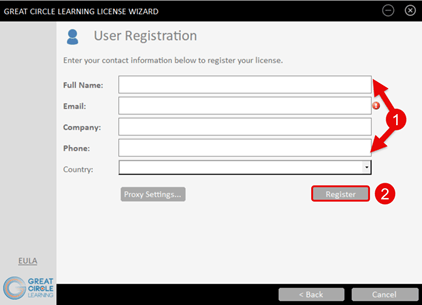
3. Complete the User Registration Form
-
Fill out the user information prompts
-
Click the Register button
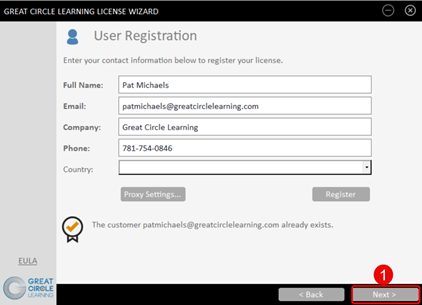
4. The User Registration Dialog Box Updates.
-
Click the Next button
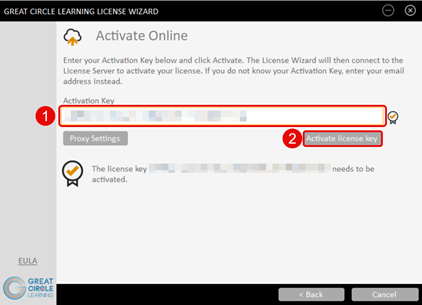
4. Enter the Activation Key for LeaderGuide Pro.
-
Paste in the Activation Key for LeaderGuide Pro
-
Click the Activate License Key button
5. The License Key Wizard Updates.
-
Click the Finish button
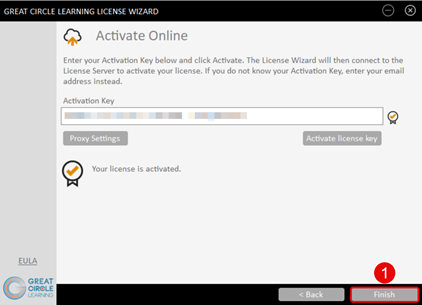
LeaderGuide Pro is now activated on this specific computer system. You can always deactivate the software to use it on a different computer.