
Open Microsoft Word to Access LeaderGuide Pro
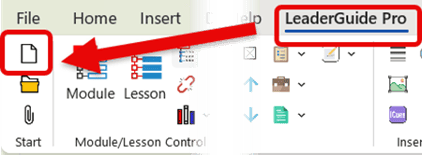
- Open Word and place a Blank document on the screen
- Click on LeaderGuide Pro along the top of the Word ribbon
- Click on New on the LeaderGuide Pro ribbon
This will launch the Start a New Guidebook wizard
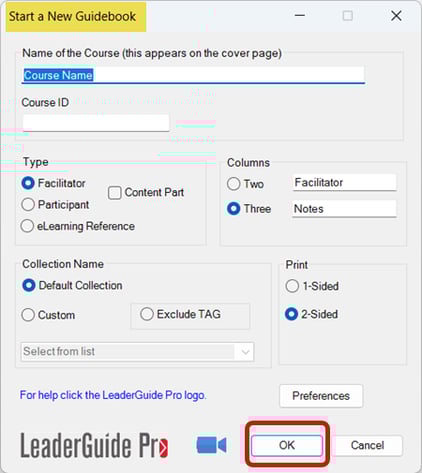
- Use the wizard to set up your new guidebook
- Click OK to create
- Take your hand off your mouse
You will see your new guidebook begin to build. Do not do anything else on your computer while this is happening.
Next: You will be prompted to SAVE your new Guide
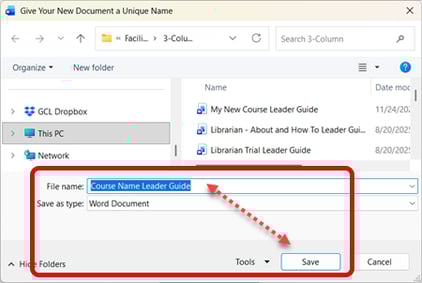
- Edit the File Name if needed
- Click Save
- Hand off your mouse as LeaderGuide Pro continues to build your new guidebook
📍TIP: We recommend saving to this location
You will be taken to either a Facilitator Guide or Participant Guide sub-folder within your LeaderGuide Pro Local Library folder in the local Documents area on your computer.
LeaderGuide Pro will default to this location when you use the Open button to access this file again.
When using LeaderGuide Pro it is best to work locally in the Documents area on your computer. Save a Copy of your facilitator guide to your shared drive.
Next: Add your initial course outline with the Guidebook Design Template
📍TIP: Drop in a starting point outline to get your guidebook structure in place
Once your new guidebook is set up, you can edit, add, reorder and delete Modules and Lessons as needed.
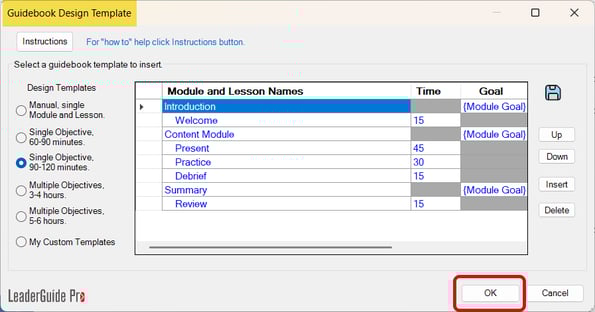
- Select an outline structure
- Edit the Module and Lesson names & order as needed
- Click OK to add your initial outline into your new facilitator guide
Hand off mouse as your document continues to build
Next: You will be prompted to add PowerPoint slides and notes
📍TIP: You can import PowerPoint at any time as you build your guidebook
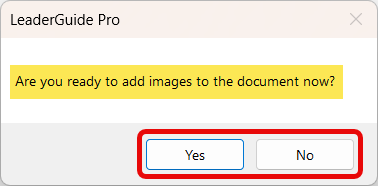
- Select Yes if you are ready or No if you are not
- If you select Yes - Follow the prompts to import your PowerPoint file
Hand off mouse as your document continues to build.
Next: After the final touches are in place you will see this message
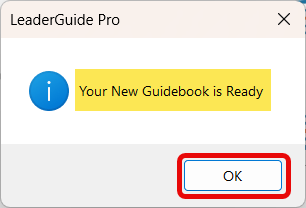
- Click OK
Your new LeaderGuide Pro facilitator guide or participant guide is now ready for you to start adding content.
Learn About
- The Start a New Guidebook wizard
- The Guidebook Design Template wizard
- Importing PowerPoint
Next Steps
- Get to Know Your New Guidebook
- Add Module information
- Add Lesson Content