


Software Management
How to Activate AuthorTec
A Quick Guide to Getting Started with AuthorTec Activation
Activation
License Key
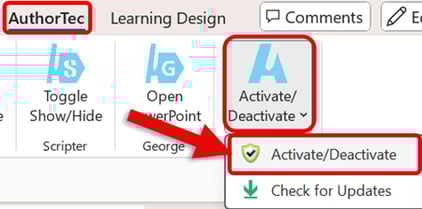
1. Open Microsoft Word to Access AuthorTec
- Click on AuthorTec on the Word ribbon
- Click on Activate / Deactivate on the AuthorTec tab
- Select Activate / Deactivate from the drop-down menu
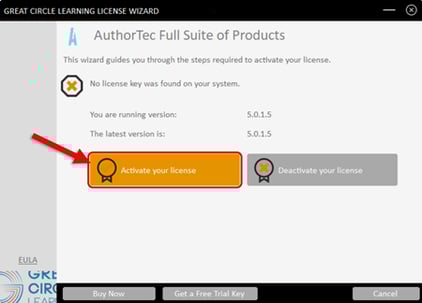
2. This Launches the Great Circle Learning License Wizard.
- Click the Activate your license button
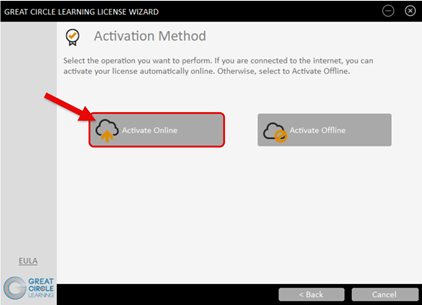
- Click the Activate Online button
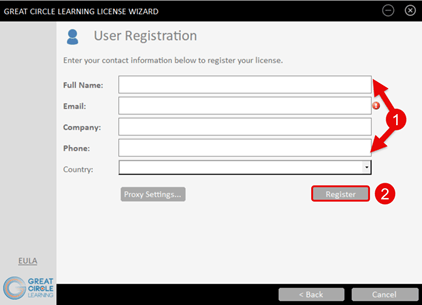
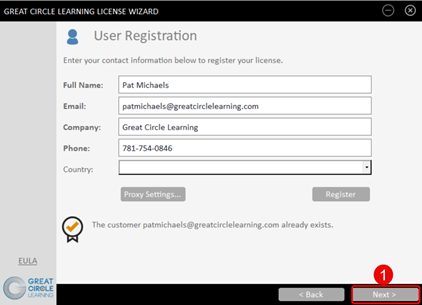
3. Complete the User Registration Form
- Fill out the user information prompts
- Click the Register button
4. The User Registration Dialog Box Updates.
- Click the Next button
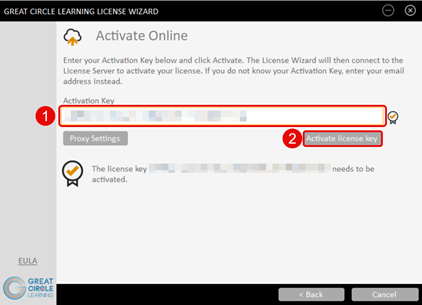
5. Enter the Activation Key for AuthorTec.
- Paste in the Activation Key for AuthorTec
- Click the Activate License Key button
6. The License Key Wizard Updates.
- Click the Finish button
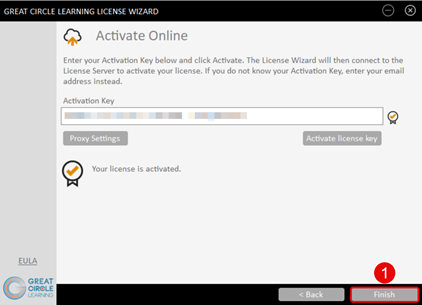
AuthorTec is now activated on this specific computer system. You can always deactivate the software to use it on a different computer.