
Overview
The Great Circle Learning License Wizard is a crucial component for activating and validating Learning Design Tool. Occasionally, users may encounter issues where the License Wizard does not launch as expected. Here are the most common causes and troubleshooting steps to help resolve the problem.
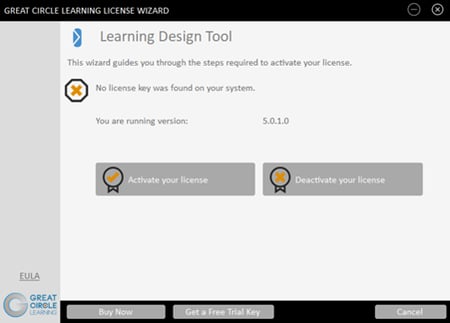
Common Causes
- Antivirus Software Has Quarantined the License Wizard Executable File
- No Access to Port 443 or Secure URLs
- Group IT Policy Prevents Launch
Antivirus Software Quarantined the .exe File
Antivirus programs are designed to protect systems from malicious software. However, sometimes they may mistakenly identify legitimate files, such as the Activation Wizard executable (.exe), as threats and quarantine or delete them.
- Check your antivirus program’s quarantine or history log to see if the License Wizard (LDT_QLM.exe) has been flagged or removed
- If found, restore the file and add an exception for LDT_QLM.exe in your antivirus settings
- Try activating Learning Design Tool again
- If that does not work, uninstall and then re-install Learning Design Tool
If the antivirus continues to quarantine the LDT_QLM.exe file
- Uninstall Learning Design Tool
- Disable your antivirus software
- Re-install Learning Design Tool
- Re-enable your antivirus software
Lack of Access to Port 443 and Secure URLs
The Great Circle Learning License Wizard requires internet access over Port 443, which is used for secure HTTPS connections. If your network restricts outbound traffic on this port or blocks access to secure URLs, the wizard will fail to launch or connect.
- Verify with your network administrator that Port 443 is open for outbound connections.
- Allow access to the required secure URLs
- https://qlm1.net/gclearning/qlmlicenseserver/qlmservice.asmx
- https://qlm1.net/gclearning/qlmcustomersite
- If you are running on a VPN, turn it off to rule out local restrictions
Group IT Policy Prevents Launch
In managed IT environments, group policies may restrict the execution of certain applications, including the Great Circle Learning License Wizard. These policies are often set to maintain security or compliance standards, but can inadvertently block legitimate software.
- Contact your IT department to check if group policies are blocking the license wizard.
- Request an exception or policy change to allow the license wizard to run
- Review any recent changes to group policy settings that might affect application launches
Additional Troubleshooting Steps
- Restart your computer and try launching the Activation Wizard again
- Reinstall the software to ensure all necessary files are present
- Check for operating system updates that may affect application compatibility