
Overview
LeaderGuide Pro includes a free trial period so you can explore the software's functionality before deciding to purchase. During the trial, you can install and use almost every portion of the program, but there are a few key limitations to note.
This article outlines those restrictions to help you get the most value from your trial and confidently plan your next steps.
Free Trial Key Details
- The free trial lasts 15 days.
- The free trial activation key is sent to your email.
- Trial documents display special markings indicating trial status.
- Files created during the trial must be opened using the LeaderGuide Pro ribbon's Open button.
- Trial documents are locked to the computer where the trial is activated.
- The ability to customize the template collections is disabled.
- Access to trial documents may end when the trial expires.
- To share demo files, they must be converted to PDF.
- All limitations are removed once you obtain a full license.
Free Trial Duration is 15 Days
- When you start your LeaderGuide Pro free trial, you have 15 days to explore and use the software from the date of activation.
- Use this timeframe to:
- Make sure it works in your IT environment.
- Try out the wide range of features in LeaderGuide Pro.
- Determine whether the program aligns with your training and development needs.
Activation Key Sent via Email
-
Provide a valid email address during free trial activation.
-
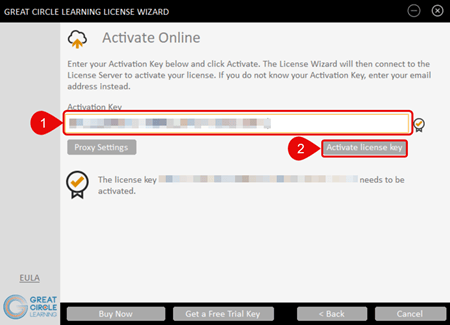
Check that email for your unique activation key.
-
Enter the license key when prompted in the Great Circle Learning License Wizard.
Trial Document Markings
|
|
|
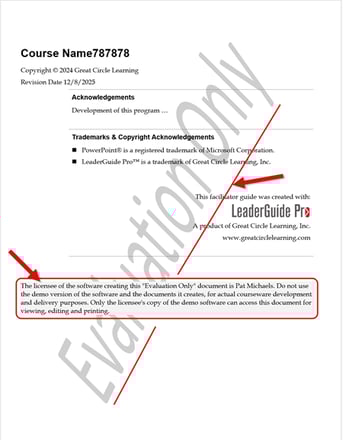
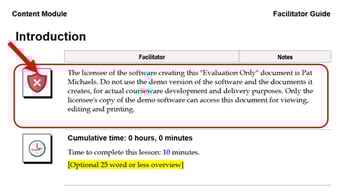
- Facilitator guides and participant guides created in LeaderGuide Pro during the free trial include distinct trial markings.
- These markings clearly show that the documents were generated in the free trial, differentiating them from documents created with a licensed version.
Opening Files with the LeaderGuide Pro Ribbon

- During the free trial, open any files you create by selecting the OPEN button on the LeaderGuide Pro ribbon within the software.
- This process ensures your trial documents are accessed and managed correctly.
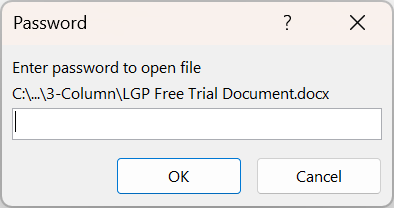
- Documents opened with File Explorer or Word's Recent Documents will be password-protected.
Computer-Locked Documents
-
Documents created during your free trial are locked to the computer where the trial is running.
-
These documents cannot be opened on other devices.
- Use LeaderGuide Pro's OPEN function to access the document on the system on which it was created.
⚠️ Do NOT rename a free trial document.
The free trial document will be unable to be opened by LeaderGuide Pro.
Customization Features Disabled
LeaderGuide Pro includes:
- A wide array of templates, icons, headlines, and other design elements that are
customizable to match your style and branding needs.- This is known as a Collection.
During the free trial:
- The customization capabilities of Collections are disabled.
- You can request a demonstration of these features at any time.
Document Availability After Trial Ends
- Documents created during the free trial may no longer be available after the trial period ends unless a license is purchased.
- Before your trial expires:
- Back up any documents you want to keep.
- Convert important files to PDF or another permanent format.
Sharing Free Trial Files: PDF Conversion Required
-
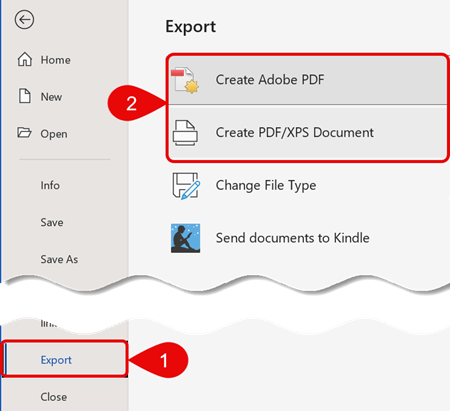
To share your demo files with others during the trial, first convert them to PDF format.
-
Use Word's Export feature to create a PDF.
-
-
Converting to PDF lets colleagues distribute and review the content, even though the original editable files remain locked to your trial computer.
Limitations Removed with Full License
After you purchase and activate a LeaderGuide Pro license, all trial limitations are removed. You’ll be able to:
- Create new documents without trial restrictions.
- Open any LeaderGuide Pro files freely.
- Share documents without needing to convert them to PDF first.
- Customize the Collection of templates to match your style and branding needs.
Next Steps
- Build Your First Guidebook
- Get a demonstration of LeaderGuide Pro
- Contact support if you have questions.
- Purchase a full license when you're ready to unlock the software's full potential.
Learn About
- LeaderGuide Pro Features
- LeaderGuide Pro Support
- Customizing
- Licensing and Pricing Information